Lost Clockwork City
Nothing opens without a little thought.
Your session starts here.
Chinese game interface · Landscape recommended on phones
Choose Load game to start.
- Input
- Keyboard + Touch
- Language
- Chinese
- Screen
- Landscape recommended on phones
- Progress
- Stored by the game host
Inside Lost Clockwork City
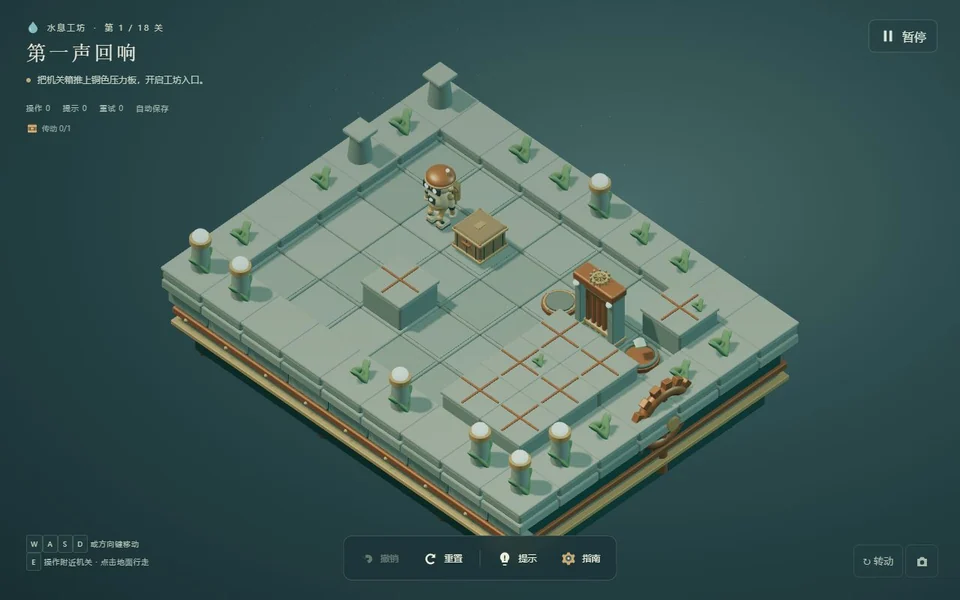
Crates, pressure plates, mirrors and water levels form the language of this mechanical city. Move through a room by understanding what each change makes possible elsewhere. A beam may need a clear route; a shifted crate can open one path and close another. Undo gives you a way to investigate a single decision, while resetting the room offers a clean starting position when you want to reconsider the whole arrangement.
The game retains its Chinese interface. Its own menus and tutorial describe the current release.
Make your move.
- WASD / arrows or click reachable ground: move
- E: interact with a nearby valve or mirror
- Z: undo · R: reset the current level
- Touch: direction pad and action controls
Click or tap inside the player before using keyboard controls. Landscape recommended on phones. Touch support does not guarantee the same performance on every phone.
A good place to start.
Trace the route to the goal before moving a crate. Test one idea at a time with undo so you can identify the action that changed the puzzle.
Session notes.
Pause, reload & saved progress
Pause using the game’s own controls before leaving. SENOVIRA cannot reliably pause or mute an external game. Reload restarts the frame and may discard unsaved progress; Unload removes it. Neither clears the game’s storage. Browser privacy settings may separate embedded and direct saves.
Playing & savesCreator, license & official release
MEST
Original game by MEST. Original material retains its stated rights. Separately credited components keep their own licenses.
Source code may be newer than the playable release. Loading the player contacts mest-lostcity.pages.dev; this host controls the game’s requests and storage.