Ember Lane Defense
Build the line. Bring the fleet home.
Your session starts here.
Chinese game interface · Flexible orientation
Choose Load game to start.
- Input
- Keyboard + Touch
- Language
- Chinese
- Screen
- Flexible orientation
- Progress
- Stored by the game host
Inside Ember Lane Defense
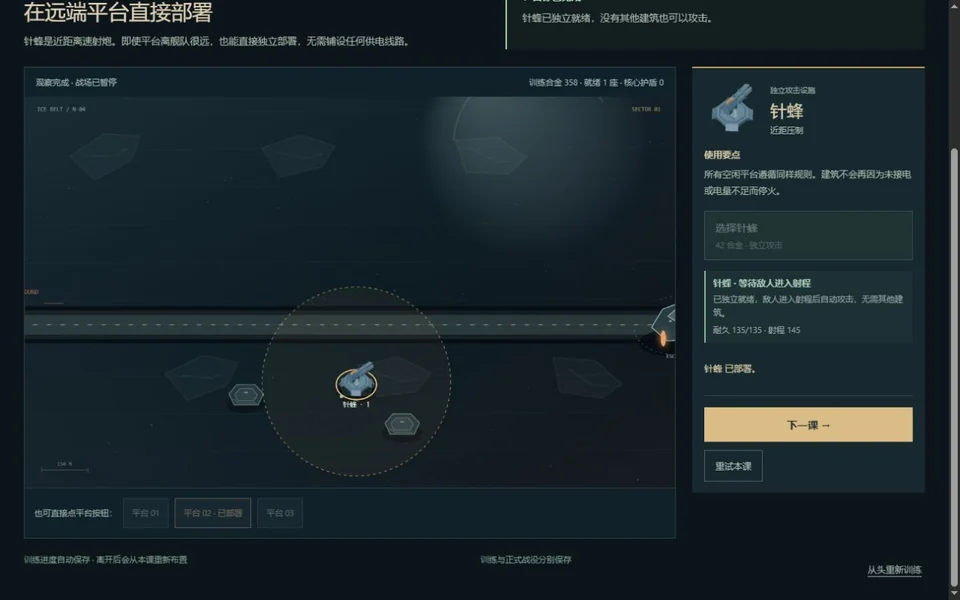
An evacuation fleet needs a route through hostile space, and you build the defenses that keep it moving. Study each facility before committing limited resources: range, placement and upgrade choices determine what your line can handle. Start in the training camp to learn construction, then take those decisions into a campaign whose changing route prevents one layout from solving every situation.
The game retains its Chinese interface. Its own menus and tutorial describe the current release.
Make your move.
- Click or tap a facility, then an open platform
- Select a defense to review its upgrades
- Space / P: pause or continue
- Use the on-screen launch and speed controls
Click or tap inside the player before using keyboard controls. Flexible orientation. Touch support does not guarantee the same performance on every phone.
A good place to start.
Use training to learn one building at a time. Before upgrading, check whether the next threat calls for stronger coverage or a different facility.
Session notes.
Pause, reload & saved progress
Pause using the game’s own controls before leaving. SENOVIRA cannot reliably pause or mute an external game. Reload restarts the frame and may discard unsaved progress; Unload removes it. Neither clears the game’s storage. Browser privacy settings may separate embedded and direct saves.
Playing & savesCreator, license & official release
MEST
Original game by MEST. Original material retains its stated rights. Separately credited components keep their own licenses.
Source code may be newer than the playable release. Loading the player contacts mest-eld.pages.dev; this host controls the game’s requests and storage.